140 lesson: make the sticks mean the field
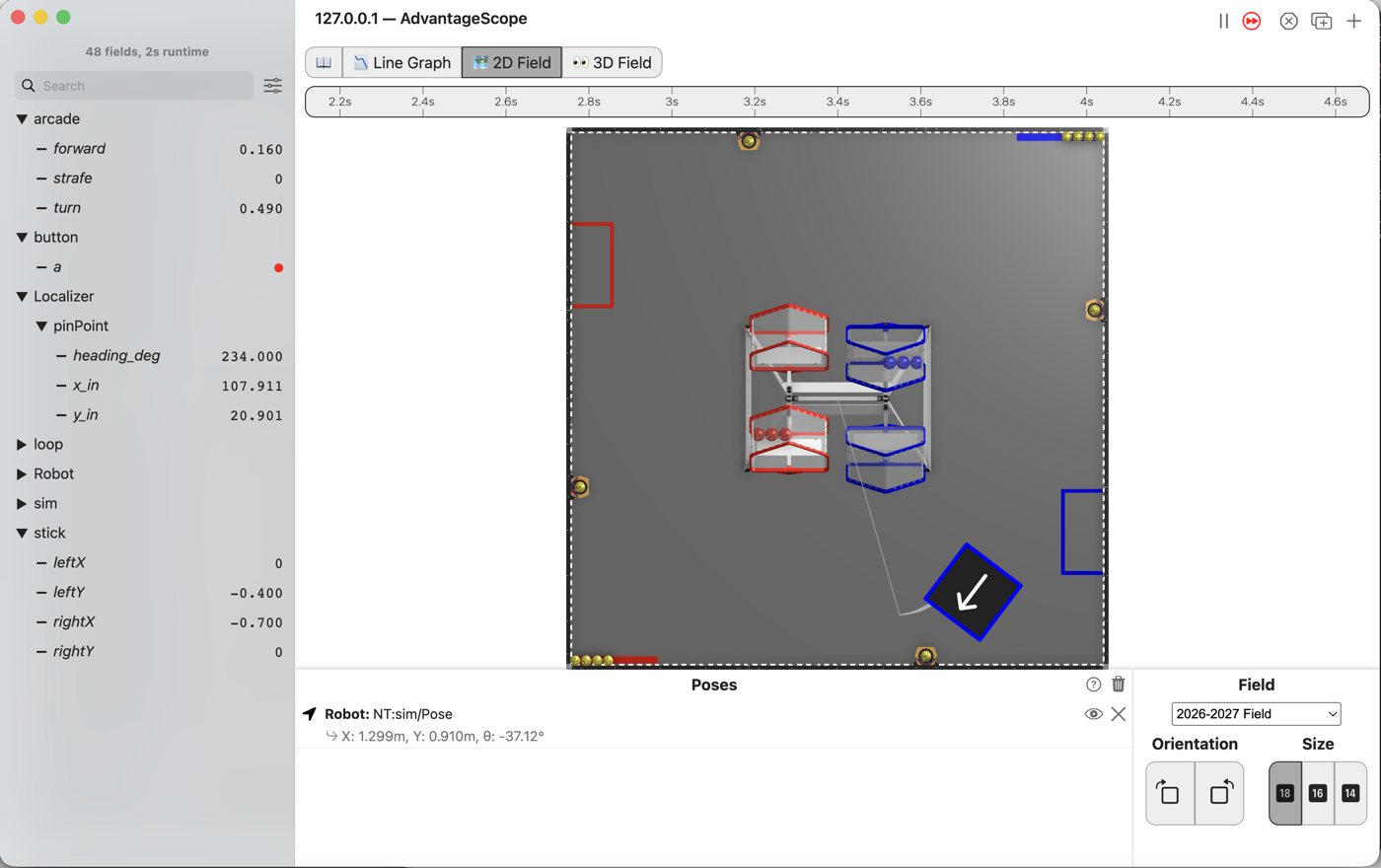
Push the stick away from you and the robot goes away from you. It does that whichever way the robot happens to be facing, so a driver never has to think about which end of the robot is the front.
Before you start.
L130 is done.
AdvantageScope is installed on the same laptop, and a gamepad is plugged into the laptop.
The robot, the Driver Station, and about 2 m by 2 m of clear floor for the last step.
Where the driver stands. “Away from the driver” is the field’s +x. The robot starts at heading 90°, facing +y, so at the start a push away from the driver slides it to its right.
the steps
L140S010: copy the starter into mytry
Copy. In lessons, click L140FieldRelativeOpMode once and copy it. Click mytry once and
paste. In the Copy Class box, click OK. If Android Studio asks whether to add the file to
Git, click Add.
Check.
mytryholdsL140FieldRelativeOpMode, and the new file is open.
L140S020: switch your copy on
Change. Delete the line @Disabled, under the comment that names this step.
Check.
Under the step’s comment, the next line reads
// 'public' so the robot can run this OpMode. 'public' allows access from any code.
L140S030: drive and turn at once, the L110 way
The starter drives the way L110 did. Forward on the stick is forward for the robot.
Simulator. In the Terminal, run:
./gradlew :TeamCode:simRun --args="mytry.L140FieldRelativeOpMode --pad"
AdvantageScope. Connect to the simulator as in L020, click 2D Field, and open the
Localizer folder, then pinPoint.
Check.
Push the left stick a little forward and the right stick left, and hold both.
The robot drives in a small circle, and
x_inandy_instay close to where they started.It goes where its nose points, and its nose keeps turning.
L140S040: turn the stick backwards through the heading
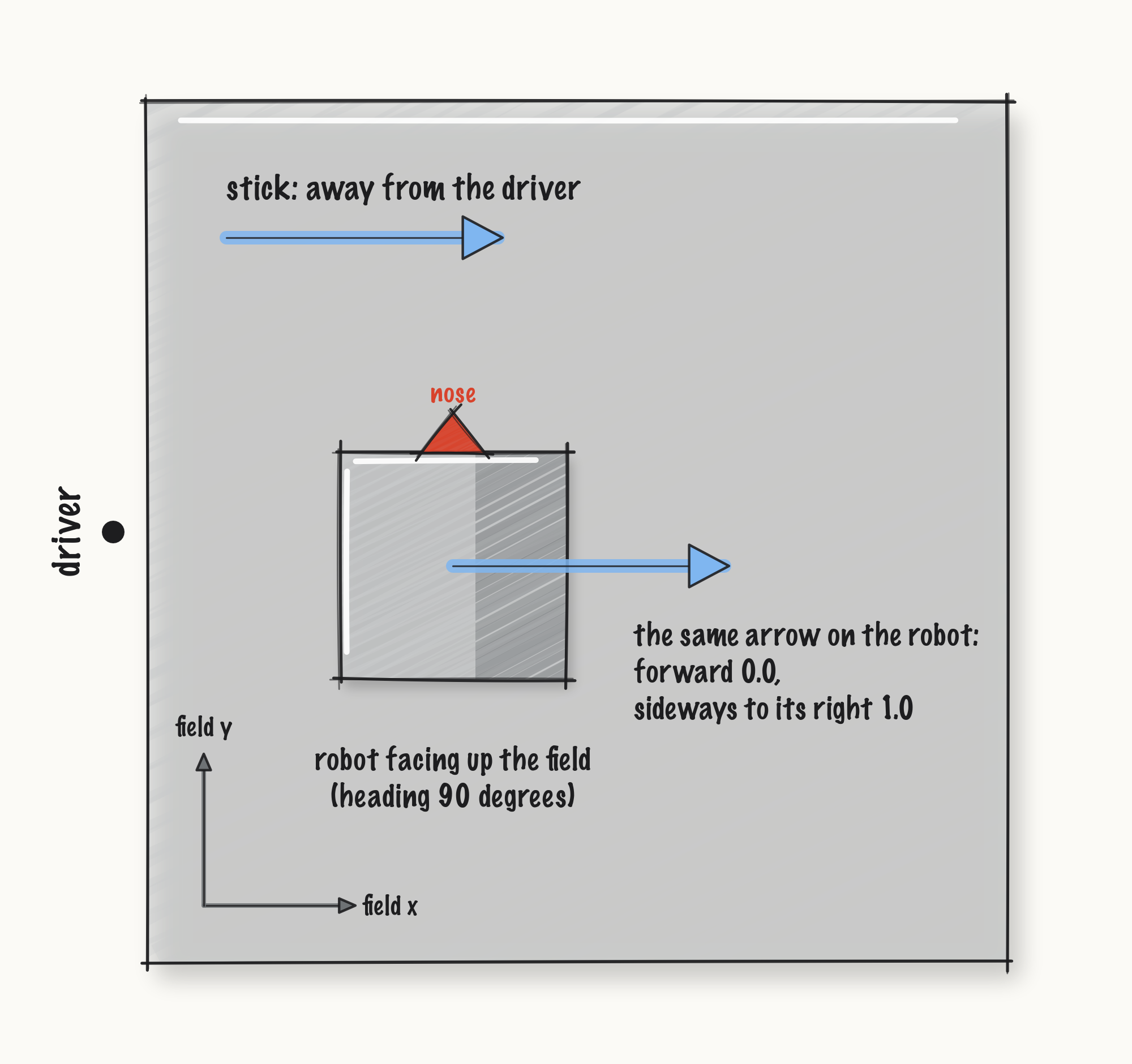
From now on, forward on the stick means away from the driver, along the field’s x. strafe means
to the driver’s left, along the field’s y. On AdvantageScope’s 2D Field, +x runs to the right and
+y runs up.
The wheels only know the robot’s own forward and sideways. L120 turned a step on the robot into a
step on the field, through the heading. This turns the other way, from the field to the robot, so
the signs on sin swap.
Change. Press Ctrl+C in the Terminal to stop the simulator. In driveFromTheSticks(), find the
comment that names this step. Delete the line drivetrain.sticks(forward, strafe, turn); under it,
and type:
        // When on L140S040, see
        // https://msb-stitt.github.io/ftc31459-26-27-biobuzz/guide/tasks/l140.html#l140s040
        // for what to do here.
        double heading = follower.pose().heading();
        double robotForward = forward * Math.cos(heading) + strafe * Math.sin(heading);
        double robotStrafe = -forward * Math.sin(heading) + strafe * Math.cos(heading);
        drivetrain.sticks(robotForward, robotStrafe, turn);
The follower knows which way the robot faces. The drivetrain does not. So the OpMode asks the follower, and does the turn itself.
Simulator. Run the same command again, and connect AdvantageScope.
Check.
Hold the same two sticks. The robot spins, and at the same time it travels to the right on the 2D Field, along +x.
x_inclimbs whileheading_deggoes around and around.
L140S050: drive it facing you
Robot. Stop the simulator. Send the code, and run L140 Field Relative from the Driver
Station. Stand off the robot’s left side, so that away from you is the field’s +x.
Check.
Push the right stick until the robot’s nose points at you.
Then push the left stick away from you. The robot drives away from you while it faces you.
Turn it a quarter turn and try again, and the stick still means the same way on the field.
No gamepad. --args="mytry.L140FieldRelativeOpMode --left_stick_y=-0.4 --right_stick_x=-0.7"
holds both sticks, for the circle in L140S030 and the picture at the top. Before L140S040, the run
was watched at x_in 70.812 and y_in 7.230 after about 8 s.
After L140S040, the robot drifts toward +y as it goes: one run went from x 72 in and y 10.5 in to x 179 in and y 43.5 in, about 17 degrees off a straight line. The simulator has no walls, so a run left going drives off the field.
If it didn’t, and LessonsTest.l140_fieldRelativeIgnoresWhichWayTheRobotFaces fails with
same stick, still moves away from the driver expected:<0.0> but was:<1.0>, the line still reads
drivetrain.sticks(forward, strafe, turn);.
If it didn’t, and it fails with expected:<-1.0> but was:<1.0>, the turn runs the wrong way.
The minus sign is missing from -forward, or both signs on sin are the other way around.
If it didn’t, and it fails with
same stick, still moves away from the driver expected:<0.0> but was:<-0.3338674754196965>, the
heading went in as degrees. Math.cos wants radians.
What you just did. Field relative is one turn of two numbers and nothing else. The same
sticks, the same mix, the same scaling. All that changed is which pair of numbers goes in.
It also depends on the follower knowing which way the robot faces. If the heading drifts 20 degrees, the sticks are 20 degrees crooked. This is the first lesson where a mistake somewhere else in the robot shows up in the driver’s hands.
Where next. L150 puts the robot’s own directions back on a bumper, so a driver can have both.