110 lesson: hand the wheels to the path follower
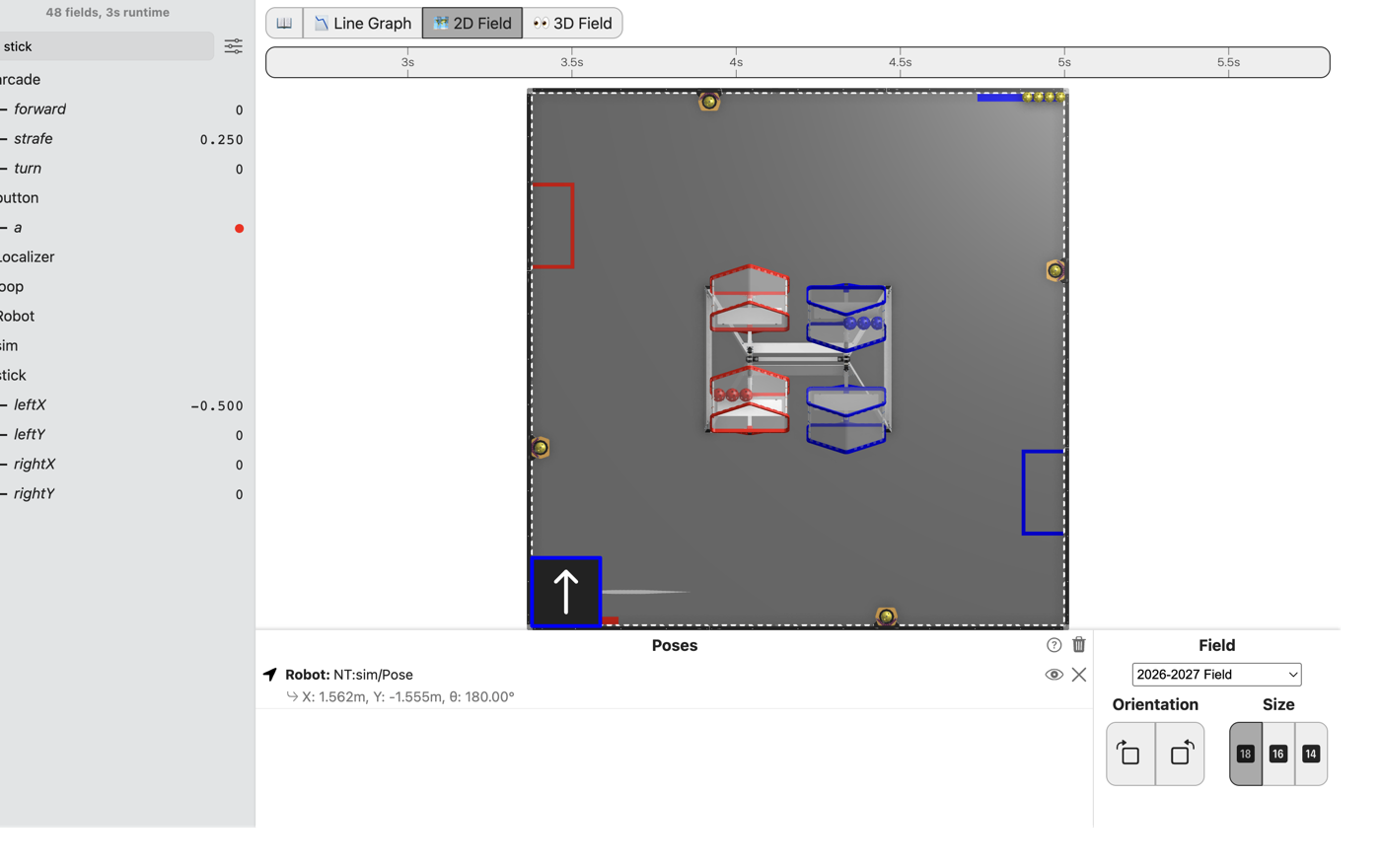
The robot drives on the sticks as it did in L090, and the path follower is holding the drivetrain. The sticks still decide where the robot goes. The path follower is Pedro Pathing’s code that drives the robot along a path; from L125 on, it drives the robot itself.
Before you start.
L090 is done, so
mytryholdsL090MecanumOpMode.AdvantageScope is installed on the same laptop, and a gamepad is plugged into the laptop.
The robot, the Driver Station, and about 2 m by 2 m of clear floor for the last step.
A follower holding the drivetrain knows where the robot is. It can hold a heading, and it can drive a path. Up to L090 the follower was handed a stand-in that ignored it, so the lesson had the motors to itself. L120 onwards need the follower to hold the real one.
the steps
L110S010: copy the two starters into mytry
This lesson has two files. One is the OpMode. The other is the drivetrain: the code that turns three numbers into four wheel powers.
Copy. In lessons, click L110FollowerDriveTrain once and copy it. Click mytry once and
paste. In the Copy Class box, click OK. If Android Studio asks whether to add the file to
Git, click Add. Do the same for L110FollowerOpMode.
Check.
mytryholdsL110FollowerDriveTrainandL110FollowerOpMode.
L110S020: switch your copy on
Change. In L110FollowerOpMode, delete the line @Disabled, under the comment that names
this step.
Check.
Under the step’s comment, the next line reads
// 'public' so the robot can run this OpMode. 'public' allows access from any code.
L110S030: write the mix
Open L110FollowerDriveTrain. It extends CorbelsDriveTrain, which means it gets everything
CorbelsDriveTrain already has. That class sets each motor’s direction, scales the powers as L090
did, and sends them to the motors. The one part it leaves to you is mix.
wheels is an array: four numbers in a row, in one variable. wheels[FL] is the front left
wheel’s slot, and FR, BL and BR name the other three.
Change. In mix, find the comment that names this step. Under it, type L090’s four lines, each
into its own slot:
        // When on L110S030, see
        // https://msb-stitt.github.io/ftc31459-26-27-biobuzz/guide/tasks/l110.html#l110s030
        // for what to do here.
        wheels[FL] = forward - strafe - turn;
        wheels[FR] = forward + strafe + turn;
        wheels[BL] = forward + strafe - turn;
        wheels[BR] = forward - strafe + turn;
Check.
No line has a red underline, and
FL,FR,BLandBRturn purple.
L110S040: make room for the drivetrain
Change. Open L110FollowerOpMode. Near the top of the class, find the comment that names this
step. Under it, type:
    // When on L110S040, see
    // https://msb-stitt.github.io/ftc31459-26-27-biobuzz/guide/tasks/l110.html#l110s040
    // for what to do here.
    L110FollowerDriveTrain drivetrain;
This is a field, like previousButtonA in L070. It holds the drivetrain from init until the
OpMode stops.
Check.
The line has no red underline.
L110S050: hand the drivetrain to the follower
Change. In init(), find the comment that names this step. Under it, type the first line
below. Then change initAfter(); to initAfter(drivetrain);:
        // When on L110S050, see
        // https://msb-stitt.github.io/ftc31459-26-27-biobuzz/guide/tasks/l110.html#l110s050
        // for what to do here.
        drivetrain = new L110FollowerDriveTrain(hardware);

        initAfter(drivetrain);
new makes the drivetrain. initAfter makes the path follower, and the follower holds what it is
handed. Up to L090, initAfter() was handed nothing, because the lesson drove its own wheels.
The four setDirection lines from L050 are gone from init. The drivetrain sets each motor’s
direction itself, from the same config.
Check.
Neither line has a red underline.
L110S060: drive with the sticks
Change. In driveFromTheSticks(), find the comment that names this step, under the strafe
lines. Under it, type:
        // When on L110S060, see
        // https://msb-stitt.github.io/ftc31459-26-27-biobuzz/guide/tasks/l110.html#l110s060
        // for what to do here.
        drivetrain.sticks(forward, strafe, turn);
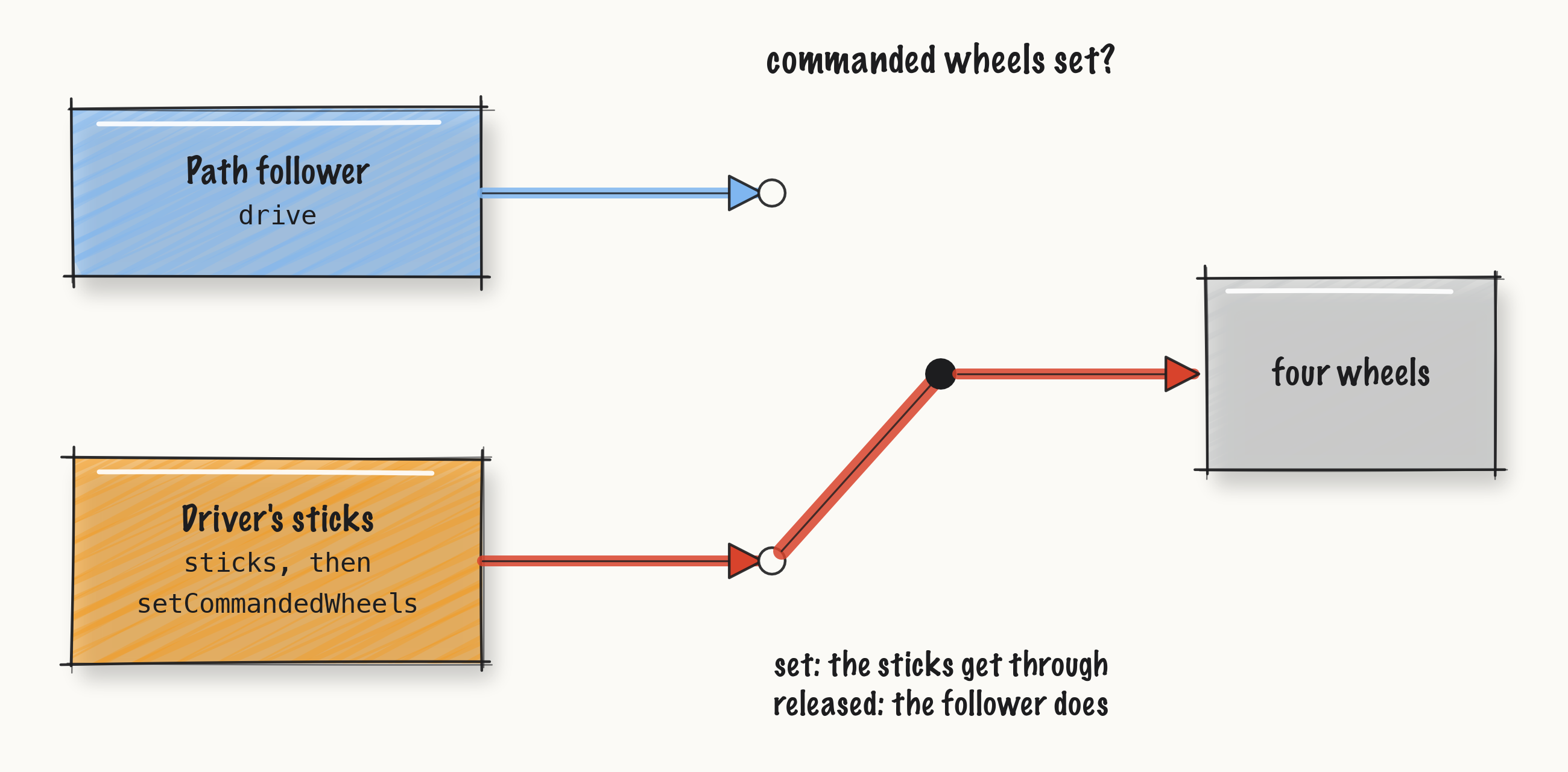
sticks sends the three numbers through your mix. Then it scales them and saves them. At the end
of the loop, loopAfter() updates the follower, and the follower drives the wheels.
Simulator. In the Terminal, run:
./gradlew :TeamCode:simRun --args="mytry.L110FollowerOpMode --pad"
AdvantageScope. Connect to the simulator as in L020, click 2D Field, and open the arcade
folder.
Check.
Push the left stick halfway left.
strafereads 0.25, and the robot slides to its own left with its nose pointing the same way.Forward, turning and the corners all work as they did in L090.
L110S070: drive it on the robot
Robot. Stop the simulator. Send the code, and run L110 Follower from the Driver Station.
Check.
It drives the way L090 did: forward, sideways, turning, and the diagonals.
No gamepad. --args="mytry.L110FollowerOpMode --left_stick_x=-0.5" slides it left for the
picture at the top. The simulator has no walls, so a robot left running slides off the field.
If it didn’t, and the robot does not move at all, initAfter is still initAfter(). The
sticks command the drivetrain, but nothing drives it, because the follower is holding a stand-in.
LessonsTest.l110_theFollowerDrivesTheSticks fails with the follower slides it left: front left expected:<-0.25> but was:<0.0>.
If it didn’t, and it slides the wrong way or turns when it should slide, a sign in mix is
wrong. LessonsTest.l110_mixGivesEachWheelItsOwnSum names the wheel and the move, such as
strafe left: back left.
What you just did. The drivetrain asks one question every time the follower updates it: has
the lesson commanded the wheels? If so, it uses what the lesson commanded. If not, it mixes what
the follower asked for. Either way the three numbers go through the same mix, so the sticks and
the follower agree about which wheel does what.
That door is ours, not Pedro’s. Pedro’s own mecanum drivetrain does only what the follower says.
Ours lets the driver reach past it to the wheels, which the teleop lessons after L120 need. The
rest of CorbelsDriveTrain, which answers everything else Pedro’s follower asks a drivetrain, is
written out with a comment above each method.
Where next. L115 mounts the Pinpoint, which the follower uses to know where the robot is.